
IRON NEST Mission 4: Counter-Battery Guide
Mission 4 quick answer: Counter-Battery is a two-phase artillery hunt. Plot every position the opening reports give you and prepare both guns before the first shell lands, because current community-extracted mission text says that impact starts the counter-battery timer. Destroy active artillery first, read every new dispatch, and be ready to locate additional batteries instead of assuming the opening plots remain complete.
Two current database-style community records list five enemy artillery, five enemy infantry, three allied spotters, 500 requisition, 0 initial powder charges, HE shells, and four medal slots. A separate current walkthrough reports four ordinary enemies after the opening batteries and two remaining after the later guns. The infantry count is therefore conflicted; follow the live objective rather than forcing either record onto every run.
- Mission 4 quick answer
- Prepare before the timer
- Two-phase route
- Scout Plane and STAR
- Troubleshooting
- Gold Medal and achievements
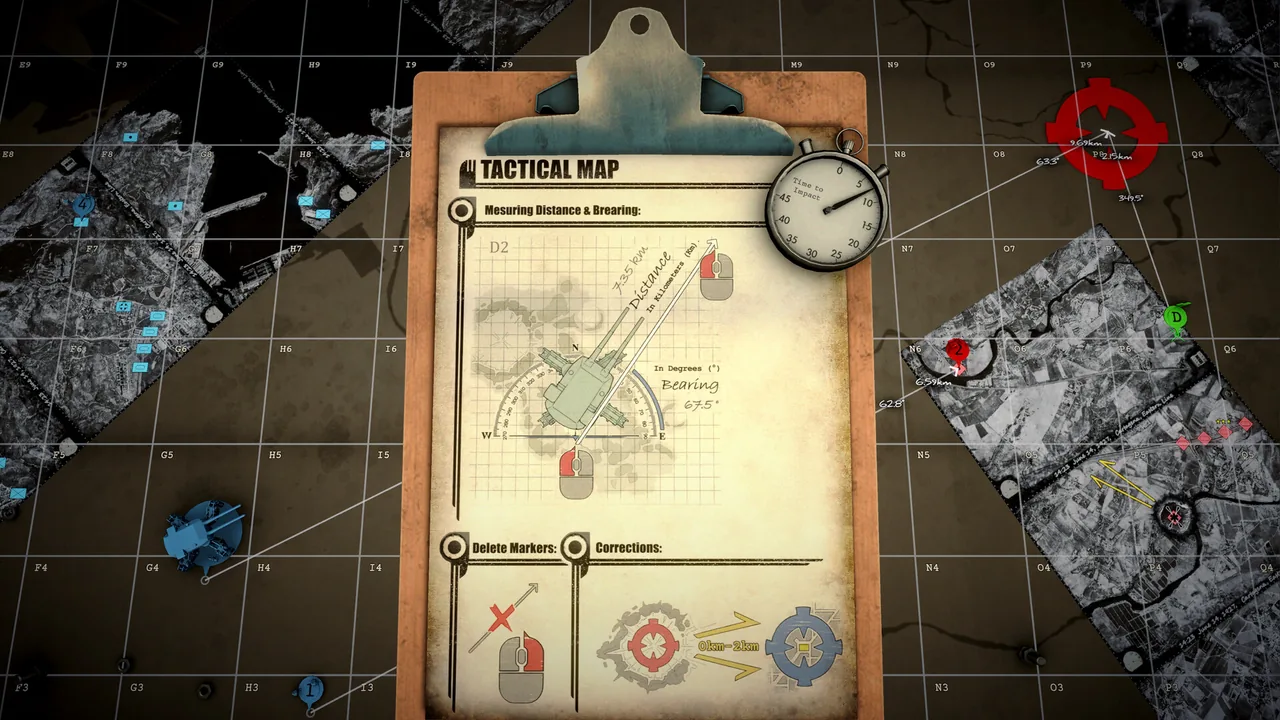
Steam official store screenshot showing the tactical-map workflow. It is illustrative and not a verified Mission 4 layout. Image source: official Steam store.
Mission 4 quick answer
| Field | Current evidence supports |
|---|---|
| Operation | Mission 4 — Counter-Battery |
| Setting | Ciudad Real, Castile-La Mancha |
| Opening resources | 500 requisition; 0 initial powder charges |
| Reported roster | Database records: five artillery, five infantry, three allied spotters; a current walkthrough records four ordinary enemies, so the infantry count is conflicted |
| Shell listing | HE; charge selection is a separate live setting. Review ammo selection by target role instead of carrying the AP/bunker example into this mission. |
| Pressure rule | Current mission records say the timer begins when the first shell lands |
| Completion recognition | First Reply — “Silence the Counter-Battery” |
| All-Gold recognition | Distinguished Conduct — earn Gold on all medals in Counter-Battery |
The zero-charge opening is a starting state, not proof of a fixed purchase price or a universal shot allowance. Read the live requisition console before committing resources. Likewise, the roster is an accounting aid—not a coordinate list.
Prepare before the timer
- Copy the firing origin and all three spotter grids. A small origin error contaminates every solution. If plotting is the blocker, use the map and triangulation guide.
- Solve every opening artillery report before firing. Current community-extracted dispatch data presents three initial battery reports using bearings or distances from allied spotters.
- Build one firing card per battery. Record target grid, bearing, range, shell, charge setting, and assigned barrel. Keep shell selection and powder-charge selection in separate fields.
- Stage both guns. Do not let one ready barrel rush you into starting the timer while the second solution is unfinished.
- Check the live resource display. Community records list 500 requisition and 0 initial powder charges, but they do not establish a universal shopping script or price table.
For the current Mission 4 route, continue with this walkthrough. For older timer reports and Demo history, see the broader Counter-Battery mechanics page.
Two-phase route
Phase 1 — clear the reported artillery
Fire only after the opening solutions are plotted and staged. Current mission records say the first shell landing starts the counter-battery timer. Work through confirmed artillery cards, read the result after each impact, and correct the next shot from current feedback rather than memory.
A current mission-data record also contains a “CBT extended” dispatch after an artillery asset is destroyed. Treat that as a direction—correct artillery hits preserve breathing room—not as an exact number of seconds, because the extension value is not stated by the source.
Phase 2 — reacquire additional batteries
Do not switch into casual cleanup after the opening guns fall. Current extracted dispatches warn that additional counter-battery assets have begun ranging, prior reconnaissance is not reliable, and Scout Plane and STAR ordnance are available. The safest loop is:
- pause and read the newest dispatch;
- refresh the search area instead of trusting old markers;
- plot and stage each new firing card;
- eliminate active artillery before returning to ordinary infantry;
- verify that the mission reports the counter-battery threat neutralized, then clear whatever the live objective still requires.
The Demo-era developer explanation described an exact trigger: kill the first three artillery, destroy two infantry, then two more batteries enter and a following shot activates them. That post also says randomized artillery spawns could make the sequence frustrating. It is useful design history, but it is not treated here as a confirmed current-build trigger. Follow the live dispatch and objective state if it differs.
Scout Plane and STAR
Current mission-data records support only a narrow claim: later reconnaissance may be stale, the Scout Plane card remains active, and STAR is authorized. They do not establish one fixed scan line or a guaranteed reveal.
The Demo-era developer post gives the older mechanical distinction: Scout Plane covered a larger area and did not start the counter-battery timer, while STAR did start the timer but returned correction information toward a priority hostile. The same post suggested using STAR information to aim a follow-up Scout Plane. Because the mission was explicitly being tuned, verify both behaviors in the current build before making them the foundation of a Gold attempt.
Practical use under uncertainty:
- Before pressure: prefer non-firing plotting and any currently verified reconnaissance that does not trigger impact.
- After pressure starts: use live correction data to shrink the uncertainty area; do not fire repeated blind STAR rounds at the same empty region.
- After new assets appear: refresh reconnaissance because the mission text itself warns that earlier reconnaissance may no longer be reliable.
Troubleshooting
The timer started before I was ready
The likely cause is an early impact. Current mission records say the counter-battery timer begins when the first shell lands. On the retry, finish the opening plots, stage both guns, and then begin the firing sequence.
I cleared the first batteries but more artillery appeared
That is the second phase, not necessarily a failed objective update. Read the newest dispatch, assume old reconnaissance may be stale, reacquire the new threat area, and return artillery to the top of the queue.
Scout Plane or STAR found nothing
A randomized spawn or an incomplete search lane can leave the battery outside the covered area. Preserve the observed empty region, move the next search rather than repeating it, and use any STAR correction arrows only as current-run evidence. Neither tool is a guaranteed one-use solution.
A fresh full scan still shows no later batteries
An August 18 current-build player report describes the last two batteries failing to appear even after fresh Scout Plane and STAR searches. Replies suggest waiting for the new counter-battery warning before rescanning because older reconnaissance cannot show assets that have not deployed, but the reporter still could not reveal them after scanning the full area.
There is no official confirmed fix in that thread. Record the build and objective message, capture the covered areas, restart the mission, and try to reproduce once. File verification or reinstalling was only a player suggestion, not a verified repair.
My bearing lines do not meet cleanly
Recheck the firing origin, observer identity, grid transcription, units, and reciprocal-direction mistakes. Preserve a small uncertainty zone rather than inventing a perfect point. Revisit map triangulation and the beginner plotting workflow if every target misses in the same direction.
I have 0 powder charges at the start
The two current community records describe 0 initial powder charges. They do not prove the final allowance, acquisition method, or purchase cost. Use the live requisition interface and record any change separately from shell type.
The mission did not end when artillery went quiet
Database-style records list five enemy infantry, while one current walkthrough records four ordinary enemies in the combat sequence. Extracted dispatches still tell the player to destroy remaining elements after the counter-battery threat is neutralized. Follow the live objective and clear confirmed hostile units; do not infer a fixed count, coordinate, or target order from either community record.
Gold Medal and achievements
Steam's official achievement list confirms two outcomes:
- First Reply: “Silence the Counter-Battery.”
- Distinguished Conduct: “Earn gold on all medals in ‘Counter-Battery.’”
The official text does not disclose the four individual Gold thresholds. Current community tables list 260 seconds remaining, no more than 30 requisition spent, and nine enemy kills as Gold candidates. Treat those numbers as community-derived until the current result screen confirms them. The exact Triple Kill comparator is conflicted or unresolved across the available presentation, so this page does not publish a number for it.
For a current attempt:
- prepare all opening solutions before first impact;
- prioritize artillery so timer extensions are not wasted;
- keep requisition purchases deliberate and recorded;
- finish confirmed hostile units if the live medal requires the full sector;
- read the result screen rather than assuming a community threshold still matches your build.
Track the campaign-wide requirements in the Gold Medal checklist. The separate Mission 3 Liberation guide covers the previous operation.
Where this page fits
- All 15 missions and campaign order — mission count, sequence, and navigation.
- Counter-Battery mechanics and version history — Demo developer statements and current evidence conflicts.
- Map and triangulation guide — plotting bearings, distances, and uncertainty areas.
- Ammo and shell types — AP for bunkers, HE roles, and evidence-bounded shell selection.
- Gold Medal checklist — campaign-wide Gold tracking.
Sources checked
- Steam official achievements — official names and descriptions for First Reply and Distinguished Conduct.
- Iron Nest app — Counter-Battery Mission 4 — community mission record marked as checked in-game on August 11, 2026.
- IRON NEST Field Manual — Mission 4 — current community route, evidence map reviewed August 15, 2026.
- Iron Nest DB — artillery Counter-Battery mission data — community-extracted roster, dispatch, resource, and medal fields.
- Whisper of the House — current Counter-Battery walkthrough — August 7 current-run account of the opening batteries, later deployment, ordinary enemies, timer, and sector-clear sequence.
- Steam current-build missing-battery report — August 18 report that fresh Scout Plane and STAR searches still failed to reveal the last two batteries; no official fix confirmed.
- Steam developer-marked Demo discussion — Demo-era two-stage trigger, randomized spawn, Scout Plane, and STAR explanation; retained as version-sensitive history.
- Steam official store and original Steam screenshot asset — official source page and original file for the locally optimized tactical-map image used above.

Fact check updated August 20, 2026. Mission route details are community-reported unless explicitly identified as Steam's official achievement text.